Issue:
I was facing an error "sql server 2012 edition upgrade failed" while trying to setup a SharePoint 2013 farm on a virtual machine in Windows Azure cloud. It would fail when I run the Complete SQL 2012 setup wizard. I followed this article http://blog.appliedis.com/2013/10/17/sharepoint-2013-in-azure-a-dev-environment-in-15-minutes-or-less to setup the farm and the domain.
Cause:
The article was written for an older image of the server however, I believe the issue is with the latest server image (at the time of writing this) "Visual Studio Professional 2013 Update 3 Windows Server 2012"that I selected. Although it suggests you can run the vm for six months in evaluation mode but SQL server setup would fail if you try to setup the sql instance with 'evaluation' license selected. Also didn't get much help from the Microsoft server setup guides pre-stored on the VM, I think they are outdated now.
FIX:
Anyways, I thought to use the SQL Server 2012 key from my msdn ultimate subscription ( The key was not available directly and had to download SQL server 2012 Standard x64 edition iso image). I downloaded the image directly on the azure server from msdn. I then tried to do the edition upgrade by running the SQL setup from the downloaded iso, edition upgrade was successful but 'Complete SQL server 2012.." wizard would still fail. Tried to setup the whole new sql using the msdn version but it failed too.
Then the last attempt was to run the SQL setup (SQL Server installation centre) from msdn ver, copied the product key from there (Edition upgrade option), ran the 'complete sql server 2012..' wizard (from the very intuitive windows 2012 UI, huh..) and used the key instead of selecting evaluation license.
It worked!
After finishing up SQL setup ran the script ConfigureSharePointFarmInDomain.ps1 and it worked like a charm!
Hope it helps someone as this 15 minute setup took about 4-5 hours of my time (while repeatedly saying why Microsoft why!).
PS: Do you experience degraded performance on Azure VMs? right now running my azure VM with 8 cores and 14GB RAM but I feel my local VM with 4 cores and 5GB RAM performs better than the Azure vm.
Update: I checked with Mitch Denny and acknowledged that he himself had experienced the same and explained the reason is that (which logically makes sense) not all the datacenters have the same/latest hardware, some have got older CPUs etc and it takes time for Microsoft to upgrade the hardware. This is a bit bizarre though as you would pay the same amount but you may get sub par performance form the data-centre closer to you. Furthermore it is an issue in sizing the environment (definitely an issue when I find my 3 years old 4 core 8gig local VM outperforms an azure VM with 8 cores and 14GB ram in Microsoft's Southeast Asia's datacenter). Personally I think there are other contributing factors too like efficiency of Azure in virtualising the hardware for the hosts.
Showing posts with label Tips/Tools. Show all posts
Showing posts with label Tips/Tools. Show all posts
Saturday, August 23, 2014
Monday, July 22, 2013
SharePoint 2010 - Two different Ampersand character symbols
It might be something trivial but it just ate a couple of hours of my time while debugging my SharePoint code. I thought to share it with others in case someone will be struggling with the same issue.
My code was failing to do a successful comparison between two similar looking strings.
I was trying to match the Taxonomy terms to find a matching term. The following value comparison might look equal but looking it closely you would say there is a bit of difference
Nut & Fruit = Nut & Fruit
The two ampersand characters are different, the one on the left was from the termset, while the one on the right from a single text field in a list.Anyways the resolution was simple, just update the termset with the standard character '&'
A quick resolution was to slightly modify my code to take care of this special scenario
if (termVlaue.Contains("&") && term.Name.Contains("&"))
{
if (term.Name.Replace("&", "&").Equals(termVlaue))
return term;
}
else
{
if (term.Name.Equals(termVlaue))
return term;
}
My code was failing to do a successful comparison between two similar looking strings.
I was trying to match the Taxonomy terms to find a matching term. The following value comparison might look equal but looking it closely you would say there is a bit of difference
Nut & Fruit = Nut & Fruit
The two ampersand characters are different, the one on the left was from the termset, while the one on the right from a single text field in a list.
A quick resolution was to slightly modify my code to take care of this special scenario
if (termVlaue.Contains("&") && term.Name.Contains("&"))
{
if (term.Name.Replace("&", "&").Equals(termVlaue))
return term;
}
else
{
if (term.Name.Equals(termVlaue))
return term;
}

Tuesday, June 25, 2013
SharePoint 2010/2013: System.IO.FileNotFoundException on setting master page
If you are trying to set a master page to your newly create or imported site through code and getting the following error
System.IO.FileNotFoundException: The file{path}.master/ does not exist.
at Microsoft.SharePoint.ApplicationRuntime
then try this in your code: [some sites suggested to use {subsite}.ServerRelativeUrl but it won’t work for the sitecollections under multi-level managed paths, so it is safer to use the sitecollection object].
newSubWeb.AllowUnsafeUpdates = true;
newSubWeb.CustomMasterUrl = newSubWeb.Site.ServerRelativeUrl + "/_catalogs/masterpage/{mymaster}.master";
newSubWeb.MasterUrl = newSubWeb.Site.ServerRelativeUrl + "/_catalogs/masterpage/{mymaster}.master";
newSubWeb.Update();
powershell script for any further troubleshooting:
$web = Get-SPWeb "http://{subsitepath}"
$web.MasterUrl = "/{sitecollectionpath}/_catalogs/masterpage/{masterpage.master}/"
$web.CustomMasterUrl = "/{sitecollectionpath}/_catalogs/masterpage/{masterpage.master}/"
$web.Update()
$web.MasterUrl
$web.CustomMasterUrl
$web.Dispose()
hope it would save someone else’s time.
Thursday, May 9, 2013
Installing SharePoint 2010 on Windows 2008 R2 using AutoSPInstaller – Lessons learned
(Note: The issues might be fixed with post-Mar 2013 releases of SP 2010 and/or AutoSPInstaller)
1. Known Issues and Resolution
1.1 Input XML file should have the name of the current server
If you are running the autospinstaller scripts one by one on the servers then ensure you have the server name specified at least once, with a search role, in search service application configuration section. This is a bug in the scripts, even if you have disabled the search service application it will still go inside the search section and will abort if doesn’t find the name of the server there.
1.2 Rerun PowerShell if it fails after installation and before running the configuration
There is a known issue where the powershell will halt after installing SharePoint and before configuring the farm. The resolution is simple and straight forward. Rerunning the ‘AutoSPInstallerLaunch.bat’ will resolve the issue and execute the remaining configuration steps.1.3 Create search services manually
If the installation scripts fail to create the search service application then create the service manually. If for some reasons the search service application cannot be created and gives errors then one possible resolution could be detaching the server from the farm and deleting the farm databases (worked for us).1. Step 1: Run the powershell command psconfig –cmd configdb –disconnect
2. Step 2: Using SQL Management studio, delete all of the SharePoint databases.
Ref here for more details: http://www.scottjamison.com/blog/2009/12/rebuilding-your-sharepoint-2010-farm/
1.4 Fix windows security token service. Remove and add the server
If ‘Claims to Windows Token Service’ fails to stop/start properly then try the following1. Find the service instances running on the farm
2. Identify the ID of the service instance of the ‘Claims to Windows Token Service’.
3. Attempt to stop it
a. Get-SPServiceInstance -Identity IDHere | Stop-SPServiceInstance
4. If it fails to stop then attempt to delete the service instance
a. $badjob = Get-SPTimerJob | where {$_.name -like "job-service-instance-IdHere"}
b. $badjob.delete()
c. Restart timer service
d. Attempt to stop the service again through powershell
5. If the above does not work then the other option is to remove the server from the farm and add it back
a. Login to the server using the Install account where the service is failingb. Run the SharePoint 2010 Configuration wizard and remove the server from the farmc. Verify the sites and app pools have been deleted from the serverd. Login back to the server and rerun the SharePoint 2010 configuration wizarde. Add the server to the farm againf. Finish the SharePoint and the Farm configuration wizardsg. Verify the server has been added back to the farmh. Verify the service can now be stopped and restarted.
1.5 Error Adding Index or Crawl Components
There is a possibility that SharePoint central admin will be stuck at adding an additional crawl or query component. In order to resolve this issue simply restart the SharePoint 2010 Timer Service and SharePoint 2010 Farm Administration Services and then try again
Monday, December 3, 2012
Introduction To Nintex Workflows and Forms 2010
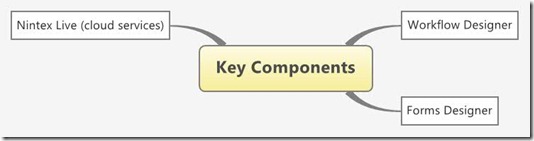
I have recently attended a 3-day training ‘Introduction to Nintex’ and thought to share what I learnt, I have created a mindmap, it was easier to do this then writing an article and i think it would be easier for you to read too. (click the image below to view it in full-size)
Update: Besides Nintex Forms, I have posted another review blog post on KwizCom Forms,as infopath forms alternative








Update: Besides Nintex Forms, I have posted another review blog post on KwizCom Forms,as infopath forms alternative


Nintex workflows and Forms - 2010

What

Main features

-
A SharePoint integrated workflow tool
-
Offers a visual WF Designer with ootb 130 actions, a form designer, cloud based Nintex Live services visual workflow monitoring
-
Out of the box workflow actions, inlcude actions for sql, web services, MS CRM, AD etc
Key Components

Workflow Designer

-
Visually design workflows that are attached to 'content types, sites, lists & libraries
-
support for single value and collectional variables
-
supports reusability through workflow templates, action snippets, action sets and user defined actions,
Forms Designer

-
Develop forms that are integrated with list/libraries
-
Develop forms for famous mobile phones/tablets using out of the box layouts
-
Publish the form on Nintex Live to make them available through internet
Nintex Live (cloud services)

-
Set of specialised Nintex services that can be integrated with your workflows
-
It is like a 'service store' where free/trial/paid services are being added
-
Some example of currently available services are translation, EMail verification, Sms, audio conversion tools, weather, news, facebook posts, twits, amazon ec2 services, dropbox/bing/google-drive/sky-drive services, office 365 services
-
make nintex forms accessible from mobile devices/tablets
Licensing Costs (approx, needs verification)

-
Workflow standard: $10,000 / WFE . $15,000/wfe for enterprise
-
Nintex Live is included with all versions of Nintex Workflow 2010 and Nintex Forms 2010 •Nintex Live requires a Software Assurance subscription
-
Nintex Forms 2010: seaprate license is required
-
$3000 / server support costs
Why

-
next step from out of the box SharePoint Designer workflows
-
Easy to use, fully integrated with SharePoint (features, ribbon menu )
-
Visual designer with visual flow monitoring
-
Nintex Live cloud services
-
130+ actions plus for/if-then controls can automate a lot more than just workflows. can be used to avoid developing custom even handlers to perform actions like delete a list item on create etc
-
130+ actions plus for/if-then controls plus scheduling options can help in implementing timer job functions without any coding
-
connect.nintex.com with high user participation. 60,310 users have contributed to 23,766 threads and 25,429 posts.
Limitations

-
Expensive for farm with multiple WFEs, may costs close to K2 Blackpearl costs
-
Sometime workflow won't work for no apparent reasons and you will have to find some workarounds (this is what was expereinced during the training)
-
No workflow debugging, you have to rely on notifications (old js days) or uls logs (out of the box log entries, you cannot add your own)
-
Does not support calling web services asynchronously
Resources

http://connect.nintex.com/ Nintex Connect allows you to discuss technical issues related to Nintex products , to ask questions, to share answers and to provide feedback. It also gives access to our Nintex product knowledge base (for Software Assurance customers), learning materials, whitepapers and RSS feeds.
Monday, November 3, 2008
WCF Performance: Don't take it for granted
Conclusion first,
Our Challenge: 300 user base, when users execute complex search queries that will go through wcf services and for that our db would take more time than usual in executing the searches then other users will experience significant delays while interacting with the system. They will get web service calls timing out but you find CPU, RAM and other hardware resources were underutilized on IIS and DB box.
Solution:
- By default WCF can't serve more than a limited number of concurrent users or requests. OUT of box WCF comes with conservative performance settings and in most of the cases you will have to tune WCF services yourself.
the key parameters that are to be set in services config file
<serviceThrottling maxConcurrentCalls="Integer"
   maxConcurrentInstances="Integer"
   maxConcurrentSessions="Integer" />
Following values should give you a good performance boost, you can even go beyond 10000 but you sould perform som load testing to see if you have got enough CPU and RAM to support.<serviceThrottling maxConcurrentCalls="3000"
maxConcurrentInstances="3000"
maxConcurrentSessions="3000" />
- basic http bindings for WCF web services provide almost double the performance as compared to secure http bindings
MS products, ready to use:
We developed the application based on WCF web services but didn't realize that we should be thinking of tuning WCF before going into production, we took it for granted that things would go normal as they used to do with other ms products (like .net runtimes, IIS etc) simply because we did not have a very large user base but what we did not know was that WCF came out of box tuned for a very limited set of users.
the key config parameters ,
if your application is running in an environment where WCF services perform some blocking operation (because of some dependency on external processes like db or file read/write operations ) then you should consider setting the following parameters appropriately in the services config file.
<serviceThrottling maxConcurrentCalls="Integer" maxConcurrentInstances="Integer" maxConcurrentSessions="Integer" />
Me and my mate Merill worked together on this task and he was the first who detailed what we did in his blog, so instead of duplicating I refer to his post, check this nice article http://merill.net/2008/10/wcf-performance-optimization-tips.
Stay tuned,
However beside tuning WCF, I have learned another lesson. The degrade in performance might not due to a single factor but may be a combination of factors when combined give rise to the problem. Trying fixes one by one might not give you a success, leaving you scratching your head. My next blog will on how to attack a slow performing application and what to look for & where, so stay tuned.
Thursday, March 13, 2008
Blogging Tips - Get the most out of your blog
There is a cool blog post by Dave "Tweaking your Blogger blog" that motivated me to share my own thoughts on blogging.
I will add some of my own tips, that I have learned over the past one year or so since I started blogging.
1.Think who will be reading your blog.
For me, I see my blog readers falling in one of two groups. The first group is of the people I know and they get my blog feeds and the other group of the people finds my blog while searching Google (oh yeah I mean Internet, Google is now a synonym to Internet search, something that I do not like, self-prophecy effect, more on this sometime later). So for the second group of people (net searchers) see if you can provide some background information and summary/conclusions. Such additional information might be obvious for first group but it will certainly help others in getting the message right.
2.Write in small paragraphs,
Personally I would close the window if I visit a blog/article with the page long paragraphs. With very less time available to us, it is really hard to read each and every line on such pages. Most of the times we will already have some partial information on the topic and will only be interested in picking up the right pieces from the blog. Breaking down your blog in small para and putting meaning full para headings will make your blog readers quickly pick the relevant information.
3.Write on latest technologies/trends
Attempt to stay ahead of the curve and while browsing net in your free time look what's new and related to your blog. Learn yourself and then share it with others. It is a great way of learning, by writing it down what you have learned. You will also get more hits on such posts. Also if you have some hard found solution for one of the problems you recently faced then that makes it a strong candidate for a blog.
4. Avoid posting your personal activities (for professionals)
Unless the topic of your blog your own/family life avoid posting posts like ' I went to the dinner", "I had great holidays"... and then describing your experience in lengths. Keep your blog focused. It is hard to get someone read your blog so don't bore them with something they are not interested. I mean who cares what I did on the weekend? Few sentences for fun are fine but If you need to put the details then better setup a separate blog for such posts. Don't make your blog a junkyard, full of stuff that is hardly useful for someone.
5. See if you can break lengthy articles into parts
That will help in two ways. First when you plan to write on something in details, you plan , plan and plan and wait for enough time to write it and then you never get chance. Second it will also help the readers in consuming it and they will come back for the next parts if they find it interesting. Another way of writing such lengthy articles is to use a blog writer, I prefer 'Windows Live Writer', it allows me to write long articles in parts, whenever I find sometime I will open up my draft post and add more.
6. Socialising on net, read other people's blog and develop your circle
Almost everyone is aware of the new ways socialising on net. So read the other people's blogs, leave comments, discuss with them topics of interest and increase your network. I love my personalised page http://www.google.com/ig , it allows me to have feeds from a number of blog posts on my home page and also is full of goodies (like feeds from CNET, technology news and funny Reuters:Oddly Enough) that will keep you update on latest trend and technologies.
7. Do some pre-reading
To make sure whatever you are writing is authentic and makes sense, don't write on simply hearing some rumours. Verify the information you are putting on your blog is correct and will provide value to the reader. I prefer to Google and verify the contents of my blog before posting it.
8. Be informal
You are not writing a report for your client, so relax and have a friendly tone in your blogs. Attempt to simulate as if you were talking to your close friend. It really makes blog interesting and fun reading.
9. Use your spare time to think about blog
Do you drive too far to reach work? do you take long train/bus rides? If you spend your time in looking outside window or taking a nap then see if you can think of something interesting for your blog. If you carry laptop/pda then you can blog then and there.
10. Blog regularly
Avoid disappearing from your blog for long periods, blog regularly, even one para each week/fortnightly would make you appear a serious a blogger (and you want to be a serious blogger!) .
Friday, February 22, 2008
MS Performance Point connection issue
I recently encountered a problem that was resolved after some hit and trial efforts. Since I couldn't find the solution on google so I thought putting up it here would help some one using Performance Point and .Net 3.5
1. Installed and configured Performance Point server, no issues
2. Setup and published dashbaords
3. Didn't use for some time and in the meantime Installed Visual Studio 2008 and .Net 3.5
4. Recently tried to run the performance point, it failed to conenct to the database server, gave following error message
" unable to connect to the specified server"
5. Tested SQL db isntances and connectivity but everything was perfect and fully accessible from elsewhere
6. Tried connecting to to Performance Point Montioring Server (File->Options->Server->Connect), didn't' work either, same error message
7. Through IIS, brought up the web services page (http://localhost/WebService/PmService.asmx). There was the error message I was looking for, the web service could not run as it failed to load system.web.extension. The config file had version=1.0.61025.0 and although I had ver 1.1, 2, 3 and 3.5 of .net framework installed still it could not load the right dll.
8. I manually edited the web config and replaced all instances of version=1.0.61025.0 with Version=3.5.0.0. That's it, it started working again.
9. I had to do the same for http://localhost/Preview/web.config to bring up the preview site.
Thanks for your help Nick, the performance point guru.
Check Nick's post on similar database connectivity issue, if this is not the issue you are facing
http://nickbarclay.blogspot.com/2007/11/pps-data-source-connection-problems.html
1. Installed and configured Performance Point server, no issues
2. Setup and published dashbaords
3. Didn't use for some time and in the meantime Installed Visual Studio 2008 and .Net 3.5
4. Recently tried to run the performance point, it failed to conenct to the database server, gave following error message
" unable to connect to the specified server"
5. Tested SQL db isntances and connectivity but everything was perfect and fully accessible from elsewhere
6. Tried connecting to to Performance Point Montioring Server (File->Options->Server->Connect), didn't' work either, same error message
7. Through IIS, brought up the web services page (http://localhost/WebService/PmService.asmx). There was the error message I was looking for, the web service could not run as it failed to load system.web.extension. The config file had version=1.0.61025.0 and although I had ver 1.1, 2, 3 and 3.5 of .net framework installed still it could not load the right dll.
8. I manually edited the web config and replaced all instances of version=1.0.61025.0 with Version=3.5.0.0. That's it, it started working again.
9. I had to do the same for http://localhost/Preview/web.config to bring up the preview site.
Thanks for your help Nick, the performance point guru.
Check Nick's post on similar database connectivity issue, if this is not the issue you are facing
http://nickbarclay.blogspot.com/2007/11/pps-data-source-connection-problems.html
Monday, January 21, 2008
How long Vista's defence could last? - 5 min
Yes, If you need to break into Windows Vista, all you need are 5 minutes. That's how long it took me to manipulate vista user accounts and set their passwords to blank, from outside windows vista. No, I am not a hacker, neither do I have an IQ level equal to Einstein and indeed that's a most surprising part, a kid with some expertise on searching Google can easily do this.
what if you forget your vista password?
Last weekend my friend contacted me for some help. His son changed his windows vista password and forgot that. He asked me if there is some way to restore that. My flat answer was 'No' and that if there were really some way to hack then it was going to be a climbing mount everest for a non-hacker.
I was confident that 'there must be no easy way' because I know how much noise now Microsoft makes when it comes to security. I told him now Microsoft is real serious about security and they must have implemented some rock solid security (at lease for some to-be-hacker). But my friend insisted if I could try something and I agreed and took his laptop for some weekend exploration (something that I had abandoned for some time, fixing friends/relatives machines).
Microsoft is Serious about security,hmmm, really?
To be honest whatever happened on the weekend left me scratching my head ' Is Microsoft really serious about security?'. I am not going to explain what exactly I did to break into vista (so that this blog should not be a first step guide for to-be-hackers) but will describe briefly.
so what did I do exactly ?
In order to break into vista, an external program (found from google with step by step guide and not at some hackers heaven) that knows how to access NTFS system can easily give you access to all windows accounts and let you set all the properties that you could set through windows GUI. So not only I managed to reset the user accounts' passwords but also I enabled the Administrator account with blank password (which is by default disabled in windows). The whole process completed within 5 minutes and then when I restarted the laptop I had access to all windows accounts, right in front of me with blank passwords.
implications,
Without going into debate of how it was possible, I am more interested in thinking what could that mean. I am really concerned about the security of personal data in PCs, particularly laptops. As others do, my own laptop is full of personal data, from credit card details to ebay accounts.
Now I can't rely on windows userid/pwd security anymore. A hacker with such a program on a disk, that I used, can easily break any windows security (even windows 2003) within minutes. Now either I use some specialised software to protect my data or explore what other advanced options are available with in windows (hard to trust now).
So if I am right in my conclusions, you better watch your back when it comes to PC security.
what if you forget your vista password?
Last weekend my friend contacted me for some help. His son changed his windows vista password and forgot that. He asked me if there is some way to restore that. My flat answer was 'No' and that if there were really some way to hack then it was going to be a climbing mount everest for a non-hacker.
I was confident that 'there must be no easy way' because I know how much noise now Microsoft makes when it comes to security. I told him now Microsoft is real serious about security and they must have implemented some rock solid security (at lease for some to-be-hacker). But my friend insisted if I could try something and I agreed and took his laptop for some weekend exploration (something that I had abandoned for some time, fixing friends/relatives machines).
Microsoft is Serious about security,hmmm, really?
To be honest whatever happened on the weekend left me scratching my head ' Is Microsoft really serious about security?'. I am not going to explain what exactly I did to break into vista (so that this blog should not be a first step guide for to-be-hackers) but will describe briefly.
so what did I do exactly ?
In order to break into vista, an external program (found from google with step by step guide and not at some hackers heaven) that knows how to access NTFS system can easily give you access to all windows accounts and let you set all the properties that you could set through windows GUI. So not only I managed to reset the user accounts' passwords but also I enabled the Administrator account with blank password (which is by default disabled in windows). The whole process completed within 5 minutes and then when I restarted the laptop I had access to all windows accounts, right in front of me with blank passwords.
implications,
Without going into debate of how it was possible, I am more interested in thinking what could that mean. I am really concerned about the security of personal data in PCs, particularly laptops. As others do, my own laptop is full of personal data, from credit card details to ebay accounts.
Now I can't rely on windows userid/pwd security anymore. A hacker with such a program on a disk, that I used, can easily break any windows security (even windows 2003) within minutes. Now either I use some specialised software to protect my data or explore what other advanced options are available with in windows (hard to trust now).
So if I am right in my conclusions, you better watch your back when it comes to PC security.
Monday, September 17, 2007
C# - open source
A useful link for C# developers, looking for some open source solution in C#
http://csharp-source.net/
Thanks to Dave, he pointed me there when I was looking for some open source charting soluition for .net
http://csharp-source.net/
Thanks to Dave, he pointed me there when I was looking for some open source charting soluition for .net
Friday, July 13, 2007
Agile Toolbox
How many times in our environment do we find the developers not following the right processes? Sometimes it creates serious issues, affects the software quality, adds to team frustration etc.
So beside designing and developing development processes it is equally important to ensure they processes have been adopted and practised regularly. There are few tools available that let you enforce the processes in your environment. The objective of these tools is too provide one window solution where team members can collaborate and follow the (customisable ) life cycle model, project managers can manage, developer and tester can work together, and that can be used as a central repository of the documents etc.
1. RallyDev http://www.rallydev.com/
A very nice tool, offers ajax enabled dashboard/interface to plan and monitor releases and iteration, allows you to follow either some Agile or RUP development methodology and automatically fetches the unit test results (coming from some automated unit testing tool). a demo can be viewed on http://www.rallydev.com/Rally_14_logofix.html
2. Collabnet : http://www.collab.net/products/enterprise_edition/.
Free for 15 users, claims to have more than 1 million users and they have recently acquired sourceforge. It primarily targets the companies with team members located at different geographical locations but of course it can be used for a consulting or internal IT environment where multiple projects run in parallel. You can check their live demos on their web site
3. VisionOne: http://www.versionone.com/
Another product similar to RallyDev but interface is not that impressive. check the demo here
http://www.versionone.com/flashtour/VersionOne_Product_Tour.htm. Also they offer a tool they call 'AgileToolEvaluator' which basically is a checklist of the items you should be looking for in an Agile tool. though it is good but again it is from versionone so the checklist lists the items that versionone tool supports. So you can use it but also consider your environment specific requirements.
There is another buyer's guide from 'Forrester' which costs US$279 and help you in identifying your requirements and what you can find out of the tools available. find it there http://www.forrester.com/Research/Document/Excerpt/0,7211,34977,00.html
There is another good article http://alistair.cockburn.us/index.php/What_the_agile_toolbox_contains
One more tool, available for free, but for those who are following XP. http://xplanner.org/
Next time (or sometime in future) I will talk about independent tools and utilities and how those could be used in a combination to follow some agile process.
So beside designing and developing development processes it is equally important to ensure they processes have been adopted and practised regularly. There are few tools available that let you enforce the processes in your environment. The objective of these tools is too provide one window solution where team members can collaborate and follow the (customisable ) life cycle model, project managers can manage, developer and tester can work together, and that can be used as a central repository of the documents etc.
1. RallyDev http://www.rallydev.com/
A very nice tool, offers ajax enabled dashboard/interface to plan and monitor releases and iteration, allows you to follow either some Agile or RUP development methodology and automatically fetches the unit test results (coming from some automated unit testing tool). a demo can be viewed on http://www.rallydev.com/Rally_14_logofix.html
2. Collabnet : http://www.collab.net/products/enterprise_edition/.
Free for 15 users, claims to have more than 1 million users and they have recently acquired sourceforge. It primarily targets the companies with team members located at different geographical locations but of course it can be used for a consulting or internal IT environment where multiple projects run in parallel. You can check their live demos on their web site
3. VisionOne: http://www.versionone.com/
Another product similar to RallyDev but interface is not that impressive. check the demo here
http://www.versionone.com/flashtour/VersionOne_Product_Tour.htm. Also they offer a tool they call 'AgileToolEvaluator' which basically is a checklist of the items you should be looking for in an Agile tool. though it is good but again it is from versionone so the checklist lists the items that versionone tool supports. So you can use it but also consider your environment specific requirements.
There is another buyer's guide from 'Forrester' which costs US$279 and help you in identifying your requirements and what you can find out of the tools available. find it there http://www.forrester.com/Research/Document/Excerpt/0,7211,34977,00.html
There is another good article http://alistair.cockburn.us/index.php/What_the_agile_toolbox_contains
One more tool, available for free, but for those who are following XP. http://xplanner.org/
Next time (or sometime in future) I will talk about independent tools and utilities and how those could be used in a combination to follow some agile process.
Monday, April 9, 2007
Part 1- Journey to CodeCampOz - Wagga Wagga 31st Mar 2007
31st Mar 3:00 am in the morning, we left for CodeCampOz, a journey of 450 kms - oneway from Sydney to Wagga Wagga, was worth taking.
There were 14 sessions in total and most of them were good. I guess around 300-400 people attended the event (though only 10-15 ladies!) so it was big. From tourism point of view I did not find anything of interest in Wagga Wagga but I believe they chose that place as it is reachable from Sydney, Melbourne and Canberra (even people drove from Queensland and SA!, I checked the cars’ number plates).
Technically the sessions were good (of course not all of them, couple of them were so boring with very basic knowledge). The focus of the presentations were hands-on display and topics ranging from Ajax, WCF, WPF, WF, MOSS, Biztalk, Security, Tips and tricks (that session was very good) and XNA. Check for complete list of sessions http://www.codecampoz.com. It really taught me a number of things that I didn’t know before and gave a chance to find what other people are doing in the dev world. I regret I did not carry my laptop as there were wireless hot spots and people (who brought their laptops) were experimenting then and there (but remember your laptop should have a very good battery life otherwise you would be left fighting for power sockets which were very rare!!).
Here is what I take out of the sessions,
Session 1. Real world experiences with ASP.NET AJAXPaul Glavich & Damian Edwards - Sat 31st Mar
It was a nice session by my ex-collegue (at EDs) Paul Glavich and Damian.
The interesting obeservation was the number of hands raised when the audience were asked "who is using AJAX?" very few, so I feel good that I am not alone !
They key things I learned
- Ajax is not just for filling ddlbs but can be used with creativity to product stunning interactive applciations
- Server centric and client centric models, check this http://blogs.msdn.com/publicsector/archive/2006/05/22/604367.aspx
- Take the storyboard approach while designing interfaces using AJAX
- The UpdatePanelAnimation control is really cool in updating the UI on fly http://ajax.asp.net/ajaxtoolkit/UpdatePanelAnimation/UpdatePanelAnimation.aspx
- Firefox + Firebug are the right tools to develop and test. If it runs in Firefox then it will definitely run in IE
Session 2 :Building applications you can take on the road by Nick Randolph - Sat 31st Mar
That session was all about developing mobile applications and the data synchronization issues. Though I do not develop mobile apps and don't have any plans for future but it was a great session for me to see the different world of movile apps. Here what I learned
This was another nice session discussing both WWF and Biztalk, differences and uses
There were 14 sessions in total and most of them were good. I guess around 300-400 people attended the event (though only 10-15 ladies!) so it was big. From tourism point of view I did not find anything of interest in Wagga Wagga but I believe they chose that place as it is reachable from Sydney, Melbourne and Canberra (even people drove from Queensland and SA!, I checked the cars’ number plates).
Technically the sessions were good (of course not all of them, couple of them were so boring with very basic knowledge). The focus of the presentations were hands-on display and topics ranging from Ajax, WCF, WPF, WF, MOSS, Biztalk, Security, Tips and tricks (that session was very good) and XNA. Check for complete list of sessions http://www.codecampoz.com. It really taught me a number of things that I didn’t know before and gave a chance to find what other people are doing in the dev world. I regret I did not carry my laptop as there were wireless hot spots and people (who brought their laptops) were experimenting then and there (but remember your laptop should have a very good battery life otherwise you would be left fighting for power sockets which were very rare!!).
Here is what I take out of the sessions,
Session 1. Real world experiences with ASP.NET AJAXPaul Glavich & Damian Edwards - Sat 31st Mar
It was a nice session by my ex-collegue (at EDs) Paul Glavich and Damian.
The interesting obeservation was the number of hands raised when the audience were asked "who is using AJAX?" very few, so I feel good that I am not alone !
They key things I learned
- Ajax is not just for filling ddlbs but can be used with creativity to product stunning interactive applciations
- Server centric and client centric models, check this http://blogs.msdn.com/publicsector/archive/2006/05/22/604367.aspx
- Take the storyboard approach while designing interfaces using AJAX
- The UpdatePanelAnimation control is really cool in updating the UI on fly http://ajax.asp.net/ajaxtoolkit/UpdatePanelAnimation/UpdatePanelAnimation.aspx
- Firefox + Firebug are the right tools to develop and test. If it runs in Firefox then it will definitely run in IE
Session 2 :Building applications you can take on the road by Nick Randolph - Sat 31st Mar
That session was all about developing mobile applications and the data synchronization issues. Though I do not develop mobile apps and don't have any plans for future but it was a great session for me to see the different world of movile apps. Here what I learned
- Dynamic switching: Check if the server is available then send the request
- Passive caching vs Active Caching.Choose whichone is appropriate for your application
- Microsoft SQL Server Compact Edition: A set off dlls that you refer to in your application and instantiate DB instance.
- Microsoft Synchronization Services for ADO.NET: For mobile, one of the greates challenge is synchronising the data with the server and microsoft has a bunlde of services on offer (CTP).
- A typical sync - model includes a client-sync provider and server-sync provider along with sync tables
This was another nice session discussing both WWF and Biztalk, differences and uses
- When to use biztalk? When to use WWF? => Think Buy vs Build
- Workflow within applications = WWF
- Workflow across applications = Biztalk
- Uses of WWF: Client side workflow, Website state management , Dynamic workflow
- Use of Biztalk: Enterprise Architecture Integration, ESB/SOA, File manipulation, B2B
Session 8: My best Tips and Tricks by Dan Green
This was probably one of the best sesstion in 2-days event, though it was the last session on Sat and everyone was tiered and exhuasted but Dan Green was a pick of the presenters on that day, a very fast and speedy session, full of tips, tricks and tools, and of course with his bag full of dynamic jokes!
- Call Stack in Visual Studio: use call stack window to find how did you reach there as well as for inserting breakpoints in the callstack window, very useful feature
- Shortcut keys: almost everone knows that there are short keys in visual studio (and windows) but how many of them do we remember and use? I confess at least I do not use many. The next thing I will do is to spare some time and learn the shortcut keys and practice them. http://www.eggheadcafe.com/articles/20050511.asp
- Use #line hidden to hide the code from the debugger so that the debugger could jump over the stable code (particularly machine generated code) http://msdn2.microsoft.com/en-us/library/34dk387t(VS.71).aspx
- Debug Visualizers: Debugging Datasets with multiple datarows is a hassle but data visualize, an add-on to Visual studio, helps a lot in viewing the dataset during runtime. http://www.codeproject.com/csharp/DataDebuggerVisualizer.asp
- Visual Studio Macros: A great way to automate a sequence of tasks that we do frequently like attaching a process to the debugger. http://msdn2.microsoft.com/en-us/library/b4c73967(VS.80).aspx
- Invetigating how memory is being utilised by your objects: Enable unmanaged code debugging, execute ".load sos" in immediate window and then use commands like !jumpheap, !objsize to find who is the culprit eating up all your valuable memory http://dotnetdebug.blogspot.com/2006/03/loading-and-using-sos-from-within.html
- Alsoyou can use CLR Profiler, now .net 2.0 is available to download http://blogs.msdn.com/jmstall/archive/2005/12/17/CLR-profiler-2-0-available.aspx
- CoolCommands for Visual Studio: Gives you power to do more with visual studio, download here http://weblogs.asp.net/gmilano/archive/2006/05/10/446010.aspx
- Numerous other tools, he did not have much time to go through all of them but I will certainly look and explore them CodeRush (a good choice), Resharper, SQL Server Intellisesne, Zoomit, TestRunner.Net
enough for now, in the next post I will cover the sessions held on 1st Apr on Sunday
Subscribe to:
Posts (Atom)